





Drupal 11, released on Aug 2, 2024, with major updates. This guide will helps you how to upgrade from D10 to D11
Table of Content
Why Upgrade to Drupal 11?
Prerequisites for Upgrading
Step-by-Step Upgrade Process
- Update to Drupal 10.3.x
- Audit Your Site with Upgrade Status Module
- Address Deprecated Code with Drupal Rector
- Update Contributed Modules
- Upgrade Core to Drupal 11
- Run Database Updates and Clear Cache
- Export and Commit Configuration Changes
Post-Upgrade Considerations:
Why Upgrade to Drupal 11?
Upgrading to Drupal 11 ensures our website benefits from the latest features, security updates, and performance enhancements. Key improvements in Drupal 11 includes:
Removal of Deprecated Code: Streamlines the code-base for better performance and maintainability.
Updated Dependencies: Includes Symfony 7, Twig 3, CKEditor 5 v42, and jQuery 4.0.0.
Improved Developer Experience: Enhanced tools and workflows for developers to speed up development.
By upgrading, we ensure the site remains secure, fast, and compatible with future Drupal developments.
Prerequisites
Before initiating the upgrade process, ensure the following things are in-place:
Current Version: The website is running on Drupal 10.3.x or later.
Backup: Take a complete backup of your site, including the database and files.
Development Environment: Set up a local or dev environment to test the upgrade before applying it to production.
Composer: Ensure Composer is installed and up to date
Step-by-Step Upgrade Process
Update to Drupal 10.3.x
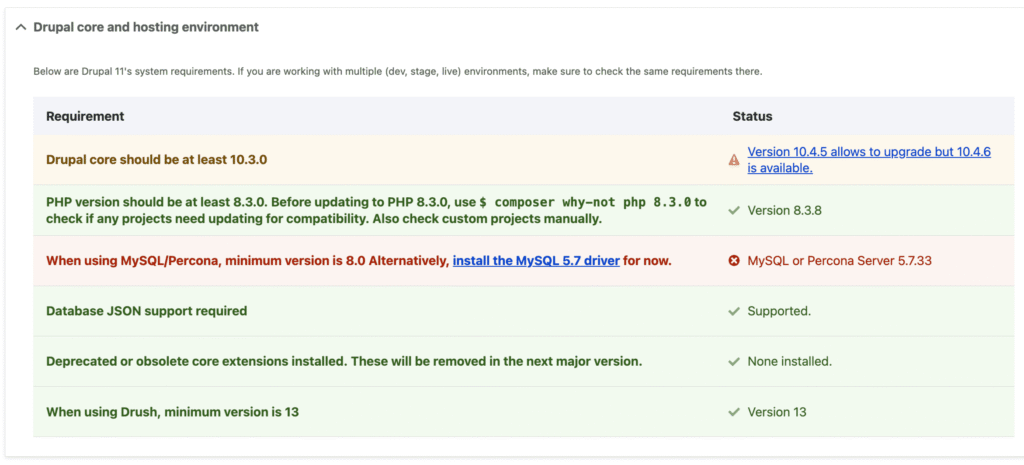
Drupal 11 requires that your website should be on Drupal 10.3.x or later. Run the following commands to update the site.
composer require 'drupal/core-recommended:^10.3' 'drupal/core-composer-scaffold:^10.3' 'drupal/core-project-message:^10.3' --update-with-dependencies
composer update
drush cr
drush updb
Removed modules in Drupal 11
Check the Site Status with Upgrade Status Module
The Upgrade Status module helps to identify deprecated code and module compatibility issues.
composer require drupal/upgrade_status
drush en upgrade_status -y
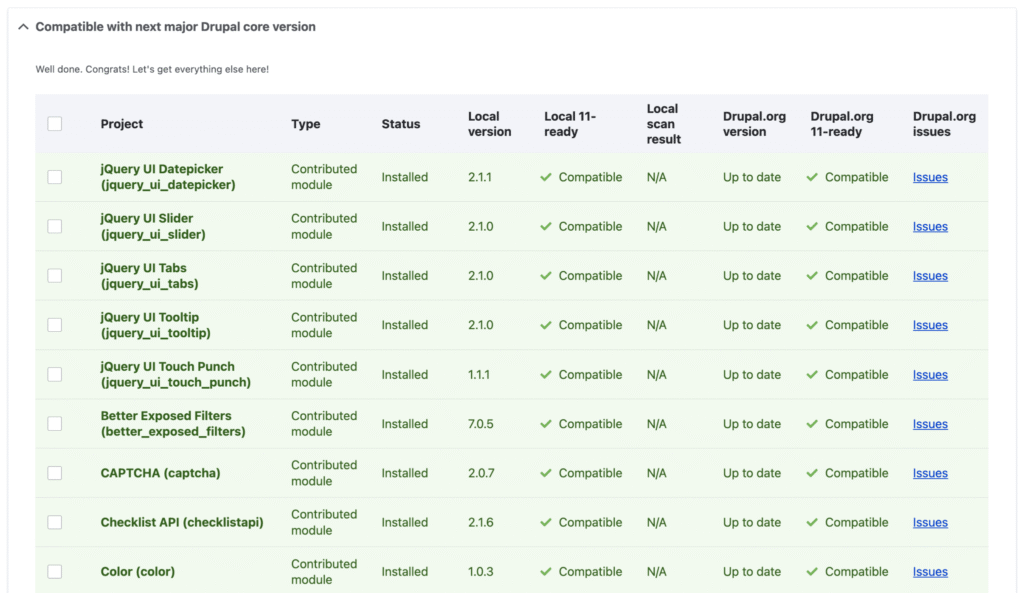
To check from admin dashboard got to /admin/reports/upgrade-status and make sure all the custom contributed modules are compatible with Drupal 11
Upgrade Core to Drupal 11
Once all modules and custom code are ready, proceed to upgrade Drupal core
composer require 'drupal/core-recommended:^11' 'drupal/core-composer-scaffold:^11' 'drupal/core-project-message:^11' --update-with-dependencies
composer update
composer require 'drush/drush:^13' --update-with-dependencies
Run Database Updates and Clear Cache
drush updb -y
drush cr
Post-Upgrade Considerations
After upgrading, consider the following:
- Testing: Thoroughly test your site’s functionality to ensure everything works as expected.
- Monitoring: Monitor logs for any errors or warnings.
- Performance: Evaluate site performance and optimize as necessary.
- Security: Ensure all modules and themes are up to date with the latest security patches.
Check if you want to learn about How to Create a Custom Module in Drupal 11

Kamran Afzal is a passionate programming mentor dedicated to helping aspiring developers become proficient in Drupal. With extensive industry experience, Kamran is committed to sharing his knowledge and guiding learners from beginner to advanced levels. His YouTube channel, Programming Mentor, offers clear and engaging tutorials on a variety of topics. Skills: Drupal 9, 10, 11, PHP frameworks, AWS, React, Angular, Node.js, MySQL, Apache, Nginx, Apache Solr, Elasticsearch, Memcache, REST API, Git, Twig





0 Comments